

The admin dashboard
Analytics, logs, users and a settings page that replaces almost every environment variable, plus a rewritten database layer and structured logging.
AIOStreams has always been configured from two places at once: a UI for everything that
belongs to a user, and a .env file for everything that belongs to the instance. The
second half meant a text editor, a restart, and a reference page open in another tab to
remember what a variable was called.
2.30 collapses that. There is now an admin dashboard, and almost every setting that
used to be an environment variable is a runtime setting you can edit in it — no restart,
no .env. Your existing environment variables keep working; they simply become
overrides, and the dashboard shows you which ones are pinned.
If you use a public instance, this release does nothing you need to know about. Existing install URLs and stored configurations keep working across the upgrade, and no re-configuration is needed. Almost everything below is for people running their own instance.
The dashboard
Nine pages, at /dashboard, for anyone with an admin login.
- Overview — instance state at a glance, with recent log lines.
- Analytics — user growth, requests by resource, and feature usage broken down by service, formatter and preset, so you can see what your users actually have configured.
- Logs — a live log viewer with filtering, rather than
docker logs. - System — process and host information.
- Users — every stored configuration, with a details view per user.
- Tasks — the scheduled jobs (pruning, cache eviction), their state and history.
- Cache — what is cached and the ability to clear it.
- Proxy — the built-in proxy's activity.
- Settings — everything else.
Settings, instead of environment variables
This is the part that actually changes how the instance is run.
Almost every environment variable is now a runtime setting stored in the database
and editable from Settings. Changes apply immediately unless the setting says
otherwise. The ones that must be read before the database exists — DATABASE_URI,
SECRET_KEY, PORT, BASE_URL, AIOSTREAMS_AUTH and friends — stay in the
environment and are documented as
bootstrap variables.
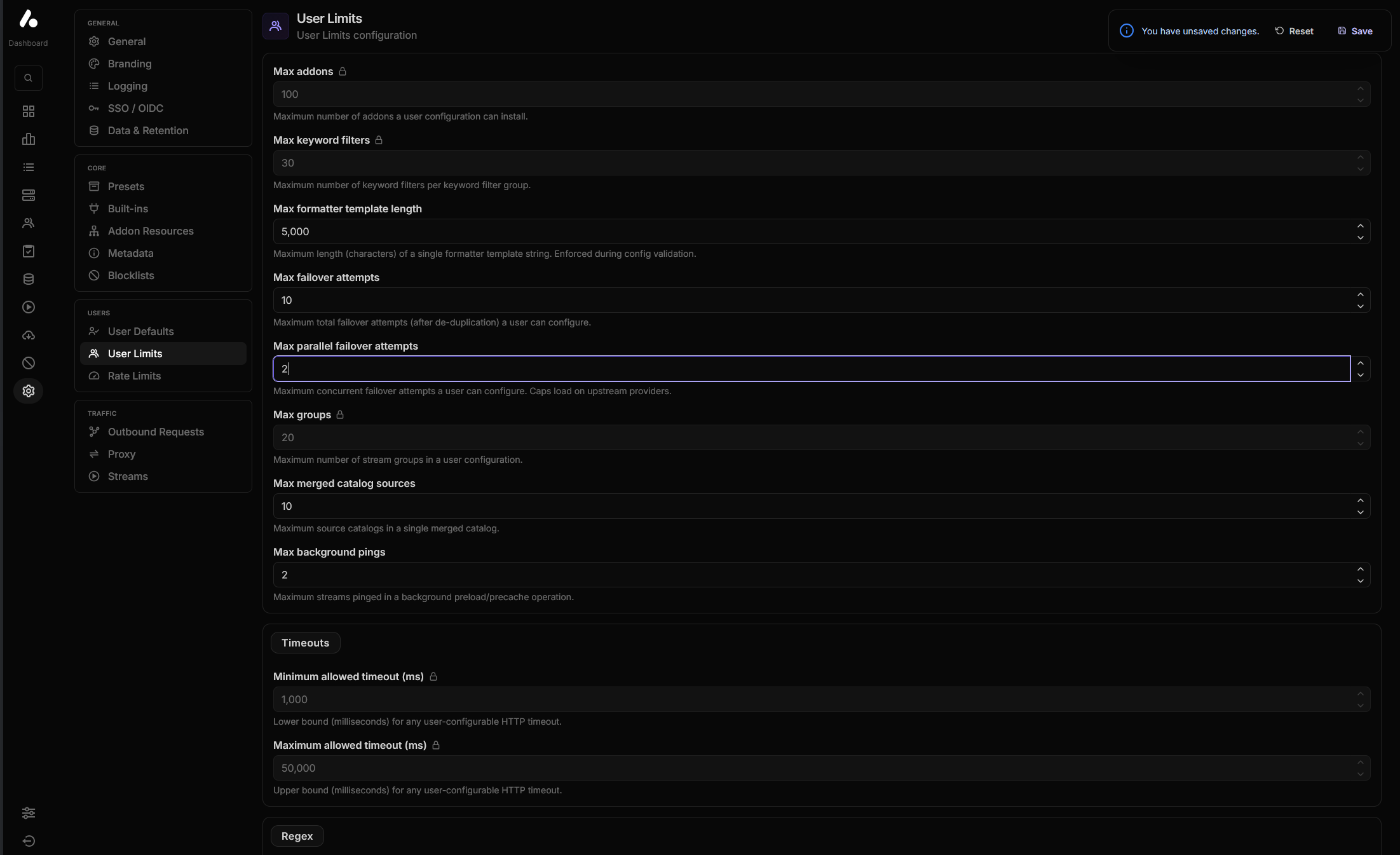
If a setting is also present in your environment, the environment wins and the field
becomes read-only in the UI, labelled as overridden. Nothing breaks by leaving your
.env exactly as it is; you just can't edit those particular fields from the dashboard
until you remove them.
Each tab has a menu with import, export, reset, and import from
environment — the last reads whatever variables are currently set and copies their
values into the database, which is how you migrate off .env without transcribing
anything by hand.
One login instead of a shared password
ADDON_PASSWORD — a single shared secret that gated the configuration page — is
replaced by real logins.
AIOSTREAMS_AUTH takes a comma-separated list of user:password pairs, and those are
the credentials for both the dashboard and (when AIOSTREAMS_AUTH_REQUIRED is on) the
configuration page. Everyone is an admin by default; AIOSTREAMS_AUTH_ADMINS narrows
dashboard access to named users, and AIOSTREAMS_AUTH_PROXY does the same for the
built-in proxy.
What used to be ADDON_PASSWORD lives on as a config access key, managed
automatically, so existing configurations keep working. See
Upgrading below for the one thing you must do.
For everyone
Your own stats
The configuration page has a Stats tab: a per-user breakdown of how each of your addons actually performed across recent stream requests, over the last 24 hours or 7 days.
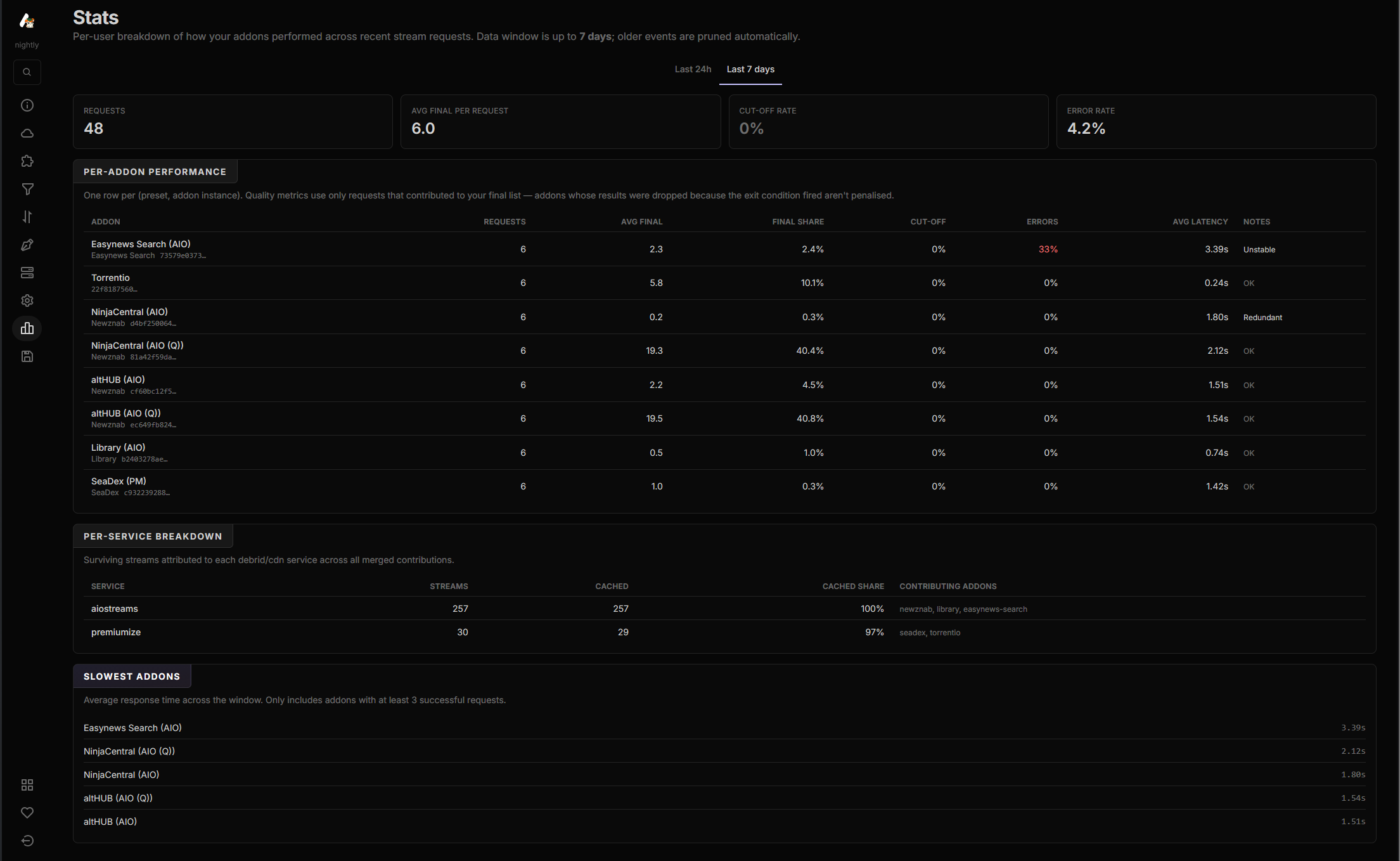
The useful column is final share — not how many results an addon returned, but how many of them survived filtering, deduplication and sorting to reach your list. An addon can return hundreds of results and contribute almost nothing, and the table labels that one Redundant. Anything erroring on more than a quarter of requests is labelled Unstable. Underneath, a per-service breakdown attributes surviving streams to each debrid or CDN service, and a slowest-addons list ranks response times.
Quality metrics only count requests where the addon could have contributed, so an addon whose results were dropped because the exit condition fired first isn't penalised for it.
It reads only your own data — the API hashes your UUID server-side, so one user can never request another's — and it appears when the instance has user analytics enabled.
Deduplicator tiebreakers
When the deduplicator has to choose between two copies of the same release that are otherwise equal, you can now say what breaks the tie, under Filters → Deduplicator:
- Torrent seeders — prefer the copy with more seeders.
- Usenet age — prefer the newer post, treating anything posted within the last 24 hours as equal.
Each one is positioned relative to your addon ordering — before it, after it, or disabled — so you decide whether "more seeders" outranks "from my preferred addon".
Smaller things
VC-1is recognised as an encode (#960).- Stream expressions gained
ceil,floor,roundandtrunc. - OpenPosterDB accepts a raw query string of custom parameters
(#994), so things like
ratings_limit=2&badge_size=l&position=brcan be appended to every generated poster when using the free public key. - The anime database was rebuilt around pluggable sources (#1026), adding nattadasu's animeApi for AniDB/AniList/MAL/Kitsu/IMDb/TMDB/TVDB/Trakt mappings alongside the existing ones.
Under the hood
None of this is visible in the UI, but all three are the reason the rest of the release was possible.
- The database layer was rewritten with a real migration system, run automatically at startup, behind one abstraction over SQLite and Postgres.
- The frontend moved to TanStack Router with rspack/rsbuild, which is a noticeable improvement in how quickly the configuration page loads.
- Logging is structured. Setting
LOG_FORMAT=jsonis recommended in production, and log output is considerably cleaner either way.
Upgrading
Keep ADDON_PASSWORD in your environment for at least one startup after
upgrading. The migration reads it to set your config access key to the same value,
which is what keeps existing configurations working. Once the instance has started
once, you can remove it.
Everything here only affects self-hosters, and only those using variables that were already deprecated before this release.
Set up logins
Since the shared password is gone, configure AIOSTREAMS_AUTH before you upgrade —
a comma-separated list of user:password pairs, e.g. admin:admin123,user1:pass1.
These are the credentials you will be asked for on the configuration page and the
dashboard.
Rotating the config access key later (via CONFIG_ACCESS_KEY or the dashboard
setting) invalidates every existing configuration until it is re-saved while logged
in. Only rotate it deliberately.
Removed environment variables
| Removed | Replacement |
|---|---|
DEFAULT_<SERVICE>_* / FORCED_<SERVICE>_* (e.g. DEFAULT_REALDEBRID_API_KEY) | DEFAULT_SERVICE_CREDENTIALS / FORCED_SERVICE_CREDENTIALS, one service.credential=value per line |
FORCE_<ADDON>_HOSTNAME / _PORT / _PROTOCOL | STREAM_URL_MAPPINGS |
FORCE_PUBLIC_PROXY_HOST / _PORT / _PROTOCOL | The proxy's Public URL field (FORCE_PROXY_PUBLIC_URL) |
ALLOWED_REGEX_PATTERNS* | WHITELISTED_REGEX_PATTERNS* |
LOG_CACHE_STATS_INTERVAL, PTT_PORT, PTT_SOCKET | Removed, no replacement |
# Before
DEFAULT_ALLDEBRID_API_KEY=xxx
DEFAULT_EASYNEWS_USERNAME=yyy

# After
DEFAULT_SERVICE_CREDENTIALS='alldebrid.apiKey=xxx
easynews.username=yyy'
The v2.30 migration guide has the full worked examples, including
the \n-separated form for environments that can't do multi-line values, and where to
find the service and credential IDs.
The User API uses Basic auth
/api/v1/user endpoints no longer accept uuid and password as query parameters or
in the body. They take the standard HTTP Basic scheme instead, where the password may be
either the raw one or the encryptedPassword token:
# Before
curl "https://your-instance/api/v1/user?uuid=$UUID&password=$PASSWORD"

# After
curl "https://your-instance/api/v1/user" \
  -H "Authorization: Basic $(echo -n "$UUID:$PASSWORD" | base64)"
HEAD (existence check) and POST (create) are unchanged. The
User API reference has the updated request shapes.
Moving your settings into the dashboard
Optional, and worth doing once you are on 2.30 and everything works.
Addons that are no longer available
The TorBox addon is deprecated and disabled, as are Debridio TV and USA TV. TorBox remains fully supported as a service, so results from other addons still resolve through it; it is only the standalone TorBox addon that is gone.
Full commit-level history for this release is in the GitHub release.