

The built-in usenet engine
Usenet streaming with no companion software at all, a failover chain rebuilt to be generic and parallel, and shareable release blocklists.
This is the largest release AIOStreams has had, and most of it is one thing: it can now stream from usenet on its own. No SABnzbd, no WebDAV mount, no companion container — you give AIOStreams your provider details and it does the rest.
The rest of the release is spread across the pipeline. Failover stopped being an NZB-only special case and became a general mechanism that also covers debrid and can race several attempts at once; the deduplicator learned to fold duplicates into the result it keeps instead of throwing them away; and a handful of addons picked up new options.
The built-in usenet engine
The engine runs inside your AIOStreams instance, so it needs an instance you control — self-hosted, or a private ElfHosted one. Nothing here applies to a public instance.
Until now, playing usenet through AIOStreams meant something else did the actual streaming: NzbDAV, AltMount or StremThru Newz on a server of your own, Stremio's own NNTP client, or a paid service like TorBox or Easynews. AIOStreams found the release and handed it off.
The built-in engine removes the handoff. It speaks NNTP to your providers itself,
pulls the articles, unpacks whatever they contain, and serves the result as an HTTP
stream from your own instance under your BASE_URL. There is no second service to
install, no WebDAV share to expose, and no credentials embedded in playback URLs.
Setup is split in two, because the provider account is the instance's and the configuration is the user's:
- Once per instance, an admin adds NNTP providers under Dashboard → Usenet → Providers: host, port, TLS, credentials and a connection limit. List order is priority, and a provider can be marked as a backup so it is only consulted when the primaries are missing articles.
- Per configuration, a user adds the AIOStreams service and pastes an
AIOSTREAMS_AUTHtoken. Their indexer results then play through the engine automatically, taggedAIO.
A new AIOSTREAMS_AUTH_PERMISSIONS variable is what makes the second half practical:
it takes username=perm1|perm2 entries drawn from admin, proxy, service and
sabnzbd, so you can hand someone a token that streams through the engine without
also handing them the dashboard. It supersedes AIOSTREAMS_AUTH_ADMINS and
AIOSTREAMS_AUTH_PROXY for any user it lists; unlisted users still default to admin.
The usenet guide has been rewritten around this and walks through the whole thing, including how the engine compares to the other playback options.
Streaming straight out of archives
Most of usenet is posted as RAR or 7z sets, which normally means downloading every volume and extracting before anything can play.
The engine does not extract. It reads the archive headers, works out which byte ranges of the video sit in which volume, and maps those onto the articles that hold them — so playback starts after a handful of articles, and a seek becomes a request for the few articles covering that offset rather than a download of everything before it. Stored (uncompressed) archives are the case this works for, which is what practically all video releases are.
It copes with the awkward real-world shapes too:
- Split sets, ordered by what the archive headers say rather than by filename.
- Obfuscated releases, where every volume has a different random name and nothing in the filename says which set it belongs to or what order it goes in. PAR2 sidecars are used to recover the real names and sizes when they are there.
- Nested archives, an archive inside an archive.
- Password-protected archives: RAR4 and RAR5 AES, and 7z including header-encrypted ones where even the file list is unreadable without the password.
The dashboard
The Usenet menu is where the engine is operated.
- Library — every NZB the engine has seen, what inspection made of it, and what is inside it. Entries can be browsed, requeued, blocked or deleted, in bulk as well as individually, and NZBs can be added by hand from a file or a URL.
- Streams — what is playing right now, with live per-connection statistics, an idle timeout, and a stop button for a single stream as well as a kill switch for all of them.
- Stats — transferred volume and connection activity over time.
- Settings — the tuning knobs. The defaults suit almost everyone; each one is documented under usenet environment variables.
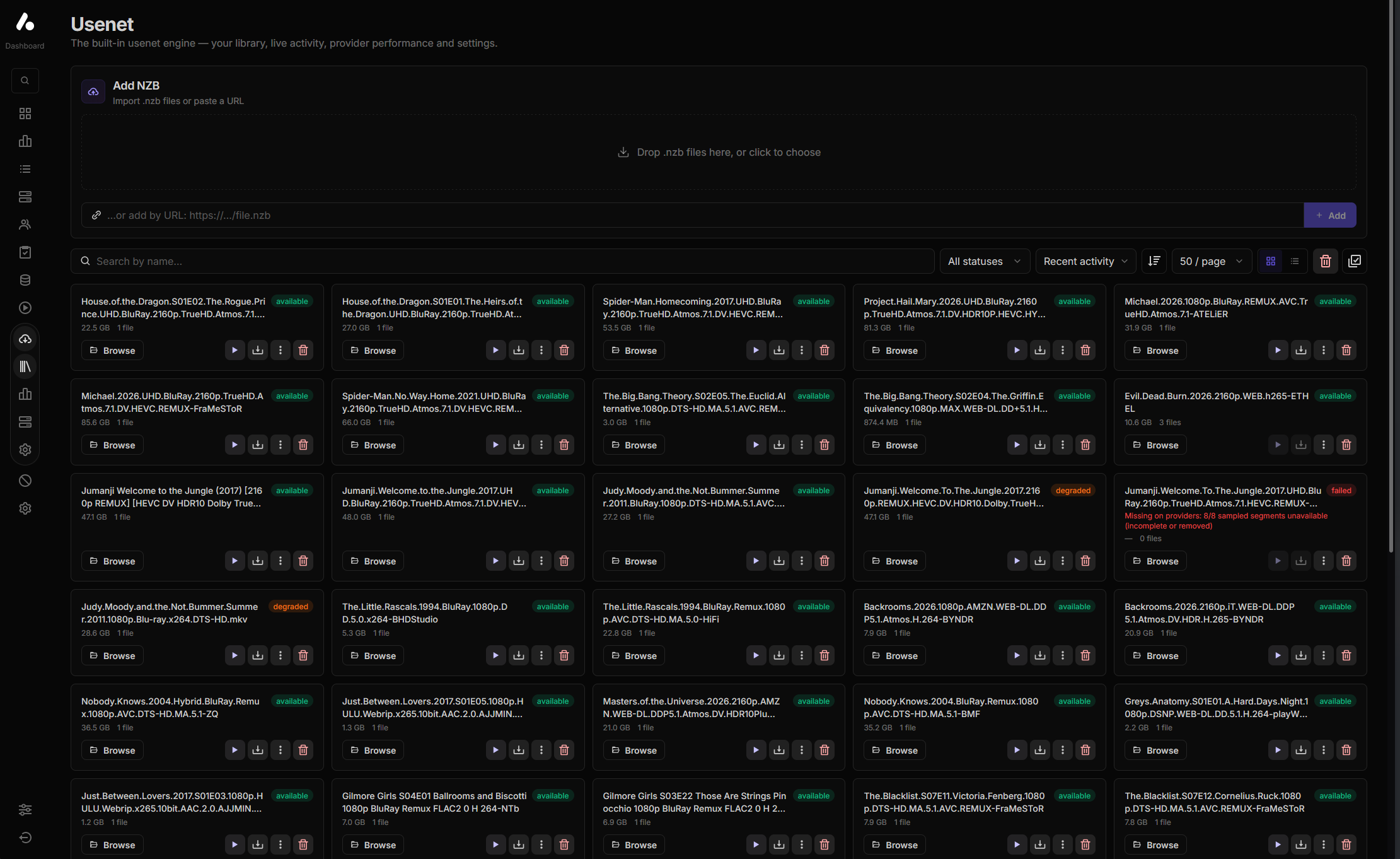
Every entry carries a verdict — available, degraded or failed — and a failed one says why, so a release that has rotted on your providers is legible at a glance rather than something you discover by clicking it. What produces those verdicts is the next section.
Playing something, watching it land in the library, and watching the stats move:
Releases that are missing pieces
Articles disappear from usenet. A release can be complete on one backbone and full of holes on another, and an indexer will happily keep listing it either way.
- Before playback, the engine verifies the release is actually retrievable. The
check is configurable:
statasks providers whether each article exists,bodyfetches it to be sure. Some providers answerstatoptimistically, sobodyis slower but honest. - A background census re-checks releases that already look suspect, so a release that has rotted since import is caught before you click it rather than after.
- When a hole is unavoidable mid-playback, the missing bytes are padded rather than the stream simply dying, so playback glitches past the gap instead of stopping.
A SABnzbd-compatible API
The engine exposes /api/v1/sabnzbd, which is enough for Sonarr, Radarr and Prowlarr
to treat it as a SABnzbd download client and send NZBs to it.
Release blocklists
Once the engine can prove a release is gone from every provider, that verdict is worth keeping — and worth sharing. Release blocklists are an instance-wide filter of known-bad releases that drops them from stream results before anything is fetched.
Verdicts are keyed by a credential-free release identity that is the same on every server: an infohash for torrents, and for usenet either a fingerprint derived from the indexer's size/poster/date (computable at search time, so it can filter the list) or a hash of the NZB's article IDs (exact, known once the NZB is parsed). The keys carry no titles, URLs or account information, which is what makes a list safe to publish.
dead is recorded automatically from all-provider evidence; defective, fake and
mislabeled are manual. You can subscribe to other people's lists with a trust level
per source, and there is a publishing page that pushes your own list to a GitHub
gist for other instances to subscribe to.
The release blocklist guide covers keys, trust, backbone scoping and enforcement.
For everyone
Failover, rebuilt
Failover used to be a small NZB-only feature: if an NZB failed to resolve, try the next one. It is now a general mechanism.
- It covers debrid as well as usenet. Pick which kinds of result may be used as failover targets, and optionally allow cross-type failover so a click on a usenet result can fall through to the next-best debrid result rather than staying within its own kind.
- External addons can be targets. Debrid links from addons AIOStreams does not resolve itself can be probed — a redirect back to the addon's own host reads as a dead link, a redirect to a CDN as success — and used as fallbacks.
- Attempts can run in parallel. Instead of trying one, waiting, then trying the next, several can race and the first healthy one wins. Losers are cancelled and cleaned up: usenet probes abort, and debrid downloads a losing attempt added are removed again (private torrents excepted).
- Racing is shaped by four timings: a backup delay giving the item you actually clicked a head start, a preferred-item grace so a healthy backup waits briefly for a higher-ranked attempt to catch up rather than winning by being slightly quicker, a max wait deadline for the whole chain, and a separate delay for same-release attempts.
- Failover can run during pre-caching (#1038), so the next episode is pre-warmed against a result that actually works.
Failover lives under Services → Failover, and proxying now applies correctly to whichever target ends up being served.
Merging duplicates instead of discarding them
The deduplicator's job was to pick a winner and drop the rest. The dropped copies often knew things the winner didn't — one addon reports an accurate audio/subtitle split, another only guessed from the filename — and that went in the bin with them.
Filters → Deduplicator → Merge Duplicates keeps it instead:
- Merged metadata fields fold information from discarded duplicates into the result you keep. Languages and subtitles are merged accuracy-aware, so an addon's real track list is never overwritten by another addon's filename guess.
- Harvest failover variants keeps the discarded copies' playback URLs as same-release failover targets. Failover can then try a different indexer's NZB of the same release before giving up on it and moving to a different release entirely — controlled by Same-Release Failover Attempts.
Addons
- AltMount now uses its native
/api/nzb/streamsAPI instead of driving it through SABnzbd plus WebDAV (#1023). - Easynews Search supports the v3 API alongside v2, selectable per instance, and attaches the media information Easynews reports — audio and subtitle languages, resolution, codecs — to its results instead of leaving it to be guessed from the filename.
- Newznab and Torznab gained a Season/Episode Search Strategy for series in
Auto mode (#1061).
Episodeis the old behaviour;Seasonqueries at the season level, which on private trackers is often where the content actually is;Dynamicpicks based on whether the season is still airing;Episode Firstfalls back to a season query when the episode search finds nothing. Pair it with Season/Episode Matching in Filters to drop what doesn't match. - Davex is a new preset, available from the marketplace. After sorting, AIOStreams reports the final stream order back to Davex, so its own failover follows your ranking rather than its own.
- SeaDex group matching is now always applied, and the match method is exposed
(#990). A stream matches either
by infohash (exact) or by release group (heuristic), and
seadex(streams, 'best', 'hash')in a stream expression restricts to the exact ones.'alt'selects listed-but-not-best entries.
AIOStreams as an indexer
Your configuration is now queryable as a newznab/torznab indexer, at
/api/v1/newznab/api and /api/v1/torznab/api, so Prowlarr, Sonarr and Radarr can
point at AIOStreams and get everything your configuration produces — every addon,
filtered and sorted the way you set it up.
It answers ID and season/episode lookups only, not free-text search, since AIOStreams
works from Stremio IDs rather than titles. Operators can turn it off under Settings
→ General → Enable newznab/torznab API (ENABLE_NAB_API).
Smaller things
- Result limits now apply after stream expressions. They used to run first, which meant an SEL expression was reasoning about an already-truncated list.
{stream.preloading}is available in the custom formatter, so you can mark which results are being preloaded rather than wondering.- The install page shows logos and links for compatible clients.
- The Seanime extension (0.9.0) can automatically play the next episode.
For self-hosters
The dashboard
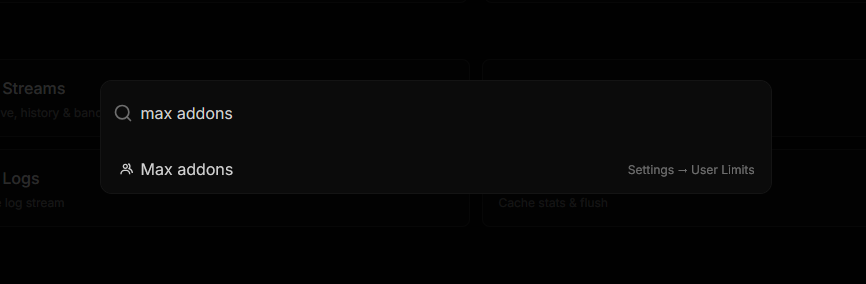
- A command palette (#1095). It jumps to any page, and it searches settings — type what a setting does and it takes you to it and highlights it, rather than leaving you to remember which page it was on.
- Log level and log format are runtime settings, changeable from the UI with no restart.
- Logs can be cleared from the dashboard (#1076).
Outbound request controls
User-agent and proxy configuration were scattered across a handful of purpose-specific
environment variables. They are now two maps that share one key scheme, under
Settings → Outbound Requests: Request header overrides
(REQUEST_HEADER_OVERRIDES) and Addon proxy config (ADDON_PROXY_CONFIG).
Both take keys that are a hostname (host), a wildcard host (*.host), a
[context] label for a request purpose ([nzb_grabs], [torrent_grabs],
[newznab], [torznab]), or *. The most specific match wins, in that order. Header
values can be a literal User-Agent or a {preset} reference to one of the built-in
header sets; the environment variable
reference lists the available presets and the
exact format for both maps.
The old Settings → Built-ins → Newznab/Torznab user agent
(BUILTIN_NAB_USER_AGENT) and Newznab/Torznab HTTP proxy
(BUILTIN_NAB_HTTP_PROXY) still work but are now marked deprecated — settings can
carry a deprecation notice that shows up in the dashboard.
Pipeline cache
Settings → Addon Resources → Pipeline cache TTL (PIPELINE_CACHE_TTL) caches the
entire processed response for a request — streams, statistics and errors — keyed per
user (#1075). It is off by
default, and it is deliberately blunt: within the TTL the previous response is
returned verbatim, including any partial errors, with no re-fetch or retry of failed
addons. Useful for cutting repeat work on a busy instance; not what you want if you
would rather a flaky addon got another chance.
The engine's disk-backed cache can also be pointed somewhere else with the
DISK_CACHE_DIR environment variable
(#1100), which is read at
startup and so has no dashboard equivalent.
Before you upgrade
Building from source now needs native build tools. The usenet engine uses
yencode, a native C++ addon that ships no prebuilt binaries, so pnpm install
compiles it with node-gyp. You need a C/C++ toolchain and Python 3 — even if you
never intend to use the engine. The deployment
guide has the details.
Using Docker? Nothing to do. The image already ships the compiled addon.
It also now preloads mimalloc, and running the server behind mimalloc (or jemalloc) is worth doing on a source install too. The engine churns through large buffers, and glibc's allocator tends to hold on to that memory rather than returning it, so resident memory creeps up over time without one.
Full commit-level history for this release is in the GitHub release.