

Profiles, SSO and a rebuilt formatter
A rebuilt formatter with a new template syntax, better search matching, and one dashboard for every stream.
There is no single headline for this release. 2.32 is a wide release: the custom formatter got a new syntax and a real editor, searching got considerably better and filtering to the right result too, and self-hosters get configuration profiles, SSO login, and one dashboard page for every stream leaving the instance.
It splits neatly in two, so this entry does the same. Everything in the first half you get automatically, whichever instance you use. Everything in the second half needs an instance you run yourself.
For everyone
The custom formatter
Two changes, one to the template language and one to the place you write it.
New syntax
Every existing template keeps working. This is all additive, and all of it exists to make templates shorter.
Modifiers no longer need an exists guard. Applying one to a field with no value
renders nothing instead of erroring, so {stream.size::bytes} is simply empty when the
size is unknown.
Optional groups render only when every field inside them has a value, and take the surrounding text with them when one doesn't:
before:  {stream.size::exists[" 📦 {stream.size::bytes}"||""]}
now:     {? 📦 {stream.size::bytes}?}
Conditionals nest, up to five levels deep, and booleans take a third branch for missing values that is distinct from false:
{stream.seadex["{stream.seadexBest["🏆"||"⭐"]}"||""]}
{service.cached["Cached"||"Uncached"||"Unknown"]}
New modifiers: ::in('a','b'), ::default('X'), ::translate('from','to'),
::subscript, ::superscript, ::languagecode, ::languageemoji, and ::string on
every type.
{service.id::in('torbox','realdebrid')["🟩"||"⬜"]}
{stream.quality::default('Unknown')}
Dates and durations take a pattern, and [...] inside one drops units that are zero:
{stream.duration::time('[%-Hh ]%-Mm')}   ->  1h 23m   /   23m
{stream.date::date('%B %o, %Y')}         ->  July 4th, 2023
Quoted literals now work anywhere a field does ({'n/a'::upper}), field and modifier
names are case-insensitive, and whitespace inside braces is tolerated. Every metadata
field is exposed, along with the new {stream.country}, {stream.episodeTitle} and
{stream.idMatched}.
The custom formatter reference covers all of it.
A proper editor, and a preview you can actually drive
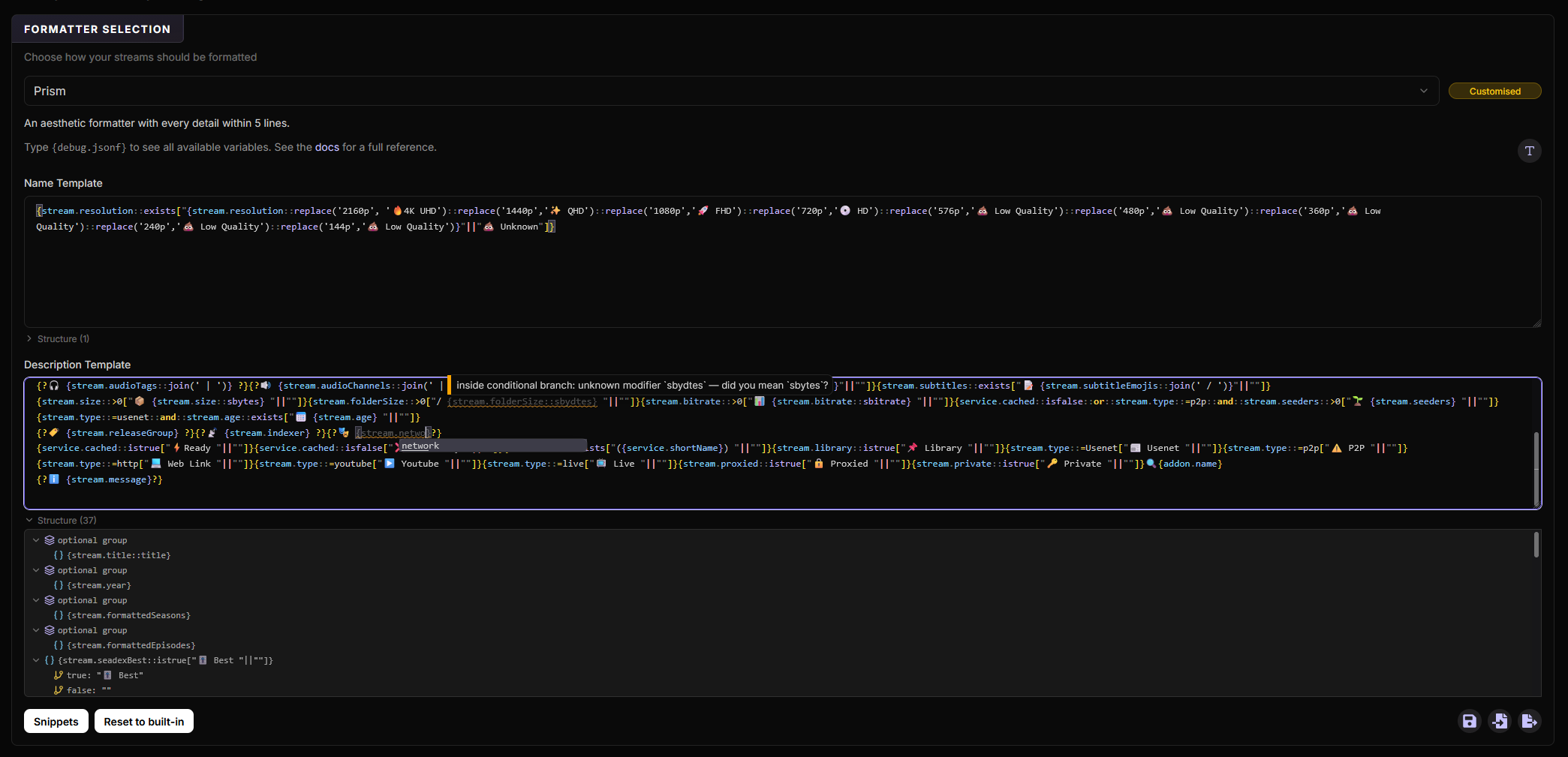
The template box is now a real editor: syntax highlighting, autocomplete for fields and modifiers, errors underlined as you type, an outline panel for jumping around a long template. The diagnostics come from the same parser that renders your streams, so what the editor accepts is exactly what will run.
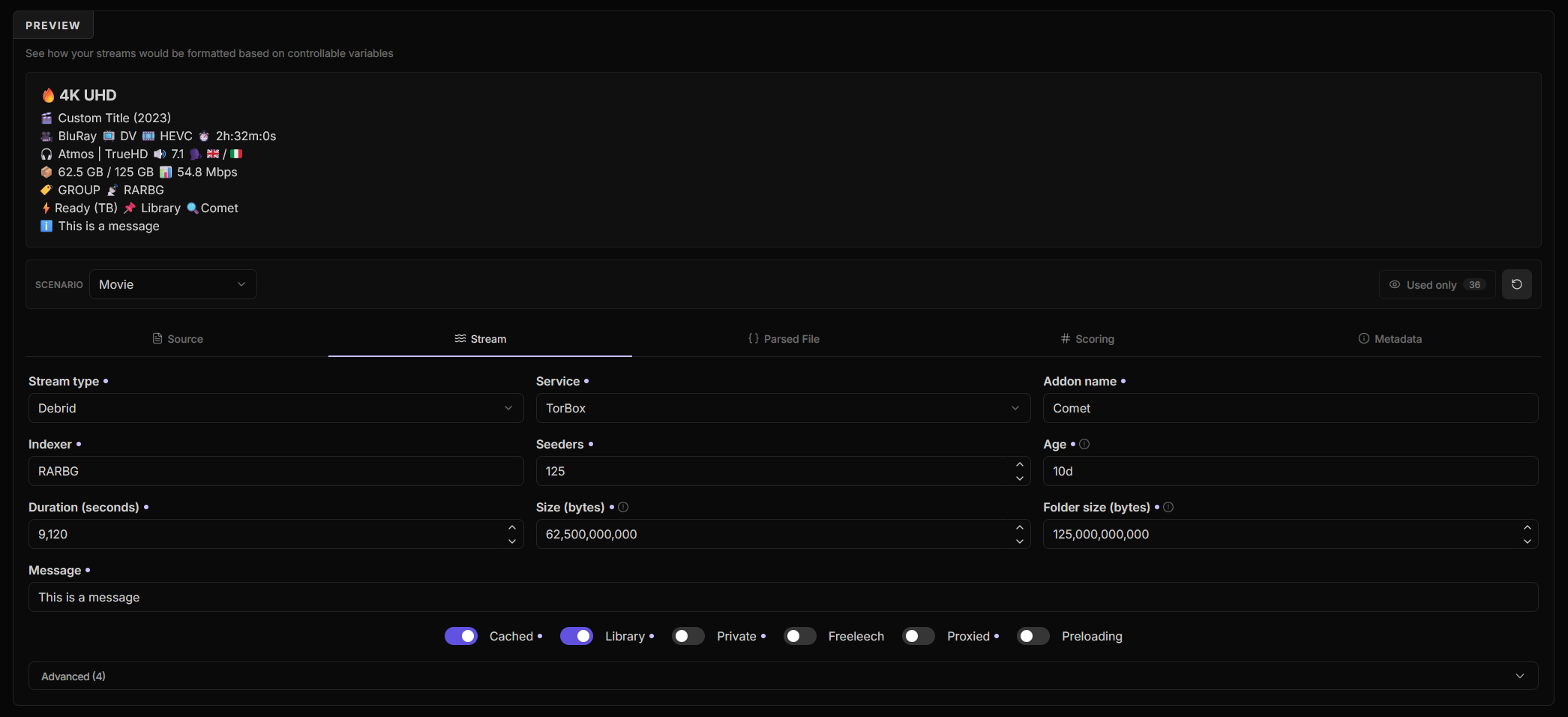
The preview underneath was rebuilt around it. Every input is editable now, not just the handful the old advanced modal exposed, and they are grouped into tabs — Source, Stream, Parsed File, Scoring and Metadata — so you can build the exact stream you want to test against and see the result immediately.
Better searching
Searching and filtering were given some improvements for certain scenarios.
- Date-based series work. Daily shows — talk shows, news, sport — are detected automatically and searched by air date rather than by a season and episode number they do not really have. Releases named by date now match the filters too.
- Same-name series are told apart. Reboots and country variants, like The Office UK against the US one, are detected as conflicts. Searches include year and country variants, and a result whose country tag names a different series is discarded. A new Ambiguous Results option under Filters lets you discard anything that isn't confirmed by a year, a country tag or an episode title.
- Episode title matching is a new filter that matches on the episode title in every language a source provides, with a similarity threshold you control and scoping by request type and addon.
- Year matching is pointwise. A series release can legitimately be tagged with the year the series started, the year its season premiered, or the year the episode aired. Each is now checked individually instead of one year being applied across the whole run, which used to throw away perfectly good releases. Strict mode applies to any request type, with Strict Request Types defaulting to movies only — series releases usually carry no year at all.
- Language inference can take a language from a matched episode title, off by default.
Newznab and Torznab
Endpoints now have a test button that probes the indexer and tells you whether it works, so a wrong URL or a bad API key is caught while you are configuring it rather than showing up later as an addon that silently returns nothing.
The separate apiPath setting is gone; enter the full endpoint URL including its path,
usually ending in /api.
Torrin
Torrin is now supported as a debrid service, through StremThru. Immediately works with all built-in addons, as well as StremThru Torz.
Smaller things
- Filter lists can be reordered by dragging, and shift-clicking the arrows sends an entry straight to the top or bottom.
repack,proper,releaseGroup,countryandepisodeTitleare available as smart detect attributes;releaseGroupis on by default.
For self-hosters
Configuration profiles
You stop typing your UUID and password.
Sign in with your AIOSTREAMS_AUTH account, save a configuration to it once, and from
then on pick it from a list instead of retyping its UUID and password every time the page
reloads.
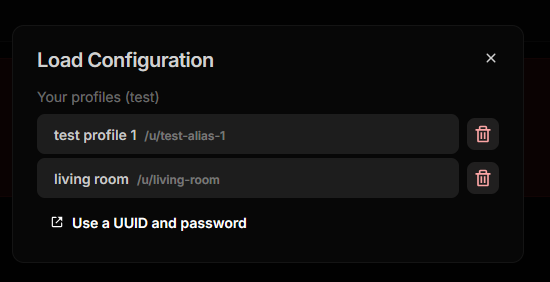
The better half of this is what happens from inside your client. With Require authentication for the config page on, hitting Configure sends you to the login page — or straight through if you already have a session — and that specific configuration opens immediately. No profile picker, no UUID, no password.
A profile can also be given a short alias, which publishes the configuration at
/stremio/u/<alias>/manifest.json and switches the Manifest URL and install buttons over
to it. The long URL keeps working, so nothing already installed is affected. This replicates
the existing ALIASED_CONFIGURATIONS environment variable, but is now more intuitive
and can be done purely from the UI rather than fiddling with encrypted blobs in the environment.
It's purpose is to give a shorter shareable URL while also letting you change UUIDs on the fly. If something happens and you lose the original UUID, you could simply just point the alias to the new UUID, and your users existing installations would continue to work without needing to reinstall.
Profiles need an account, which means either AIOSTREAMS_AUTH or SSO. They belong to
the account you signed in with, so everyone sees only their own, administrators
included, and no permission is needed beyond being able to sign in.
Saving is always explicit, because it stores the configuration password on the server. The
stored value is the same SECRET_KEY-encrypted blob that already appears in every install
URL, so a copy of the database on its own opens nothing. Full details are in the
profiles guide.
SSO / OIDC login
SSO replaces the AIOSTREAMS_AUTH half of signing in. Anywhere AIOStreams asks who you
are — the dashboard, and the configuration page when AIOSTREAMS_AUTH_REQUIRED is on —
you can now answer with an identity you already have, from any OpenID Connect provider:
Authelia, Authentik, Keycloak, Entra ID, Google and so on. However you obtain the session,
everything built on it behaves the same, profiles included.
Four settings get you there — enable, issuer, client ID and client secret — and
/.well-known/openid-configuration is discovered for you. They live under Dashboard →
Settings → SSO / OIDC and apply without a restart, or you can declare them as
environment variables instead.
Who gets in is decided by a group claim you map, and it denies by default: an identity matching no group is refused, so you open access up per group rather than closing it down afterwards. No user records are created on sign-in — a successful login issues a session cookie and stores nothing at all.
Three things SSO deliberately does not do. It does not affect Stremio addon URLs, which
remain bearer credentials regardless of how you sign in. It does not decide whether
strangers can create configurations — that is AIOSTREAMS_AUTH_REQUIRED, and nothing
else. And the built-in proxy and usenet engine authenticate with HTTP Basic, which an
SSO identity does not have, so keep one AIOSTREAMS_AUTH user for those. It doubles as
your recovery account if SSO ever breaks.
The SSO guide has worked examples for the common providers.
One Streams page
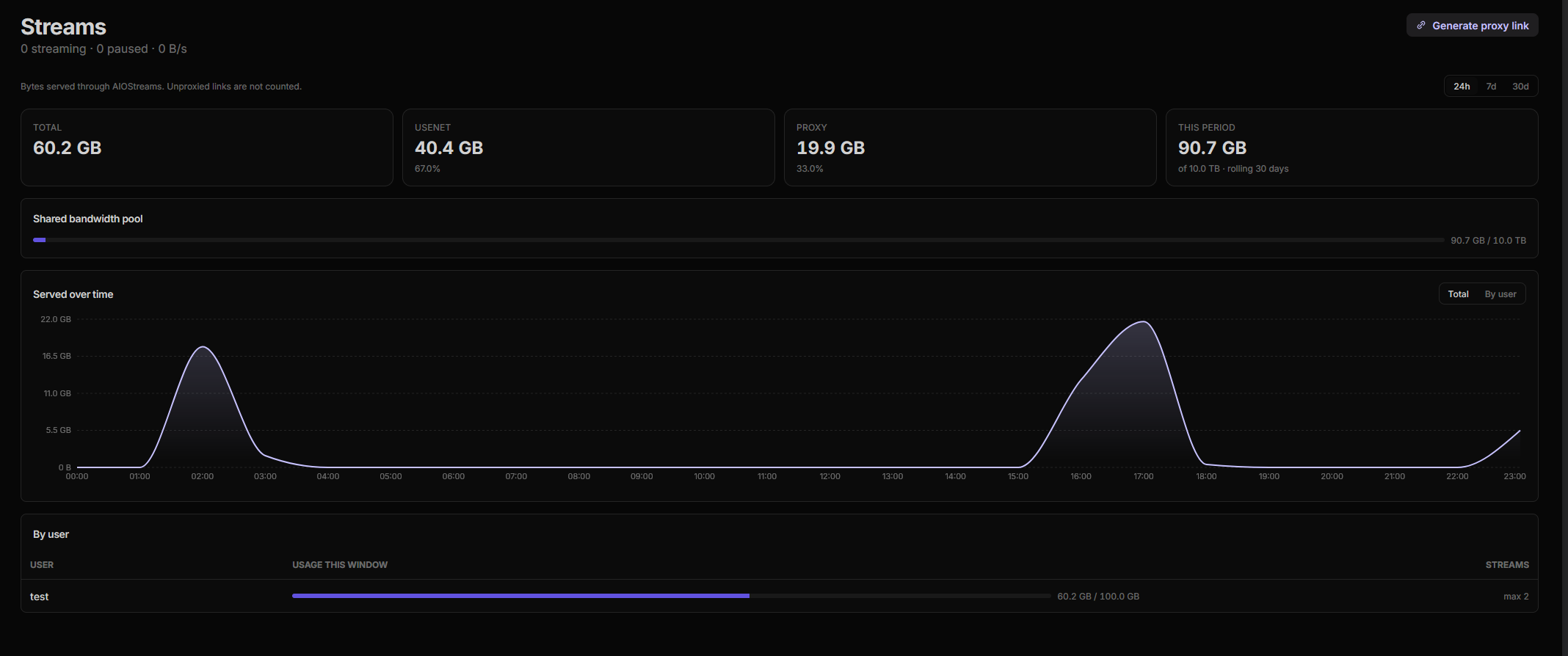
The old Proxy page and Usenet → Streams page are now a single Streams menu, and each side picked up what the other could do, along with some new additions.
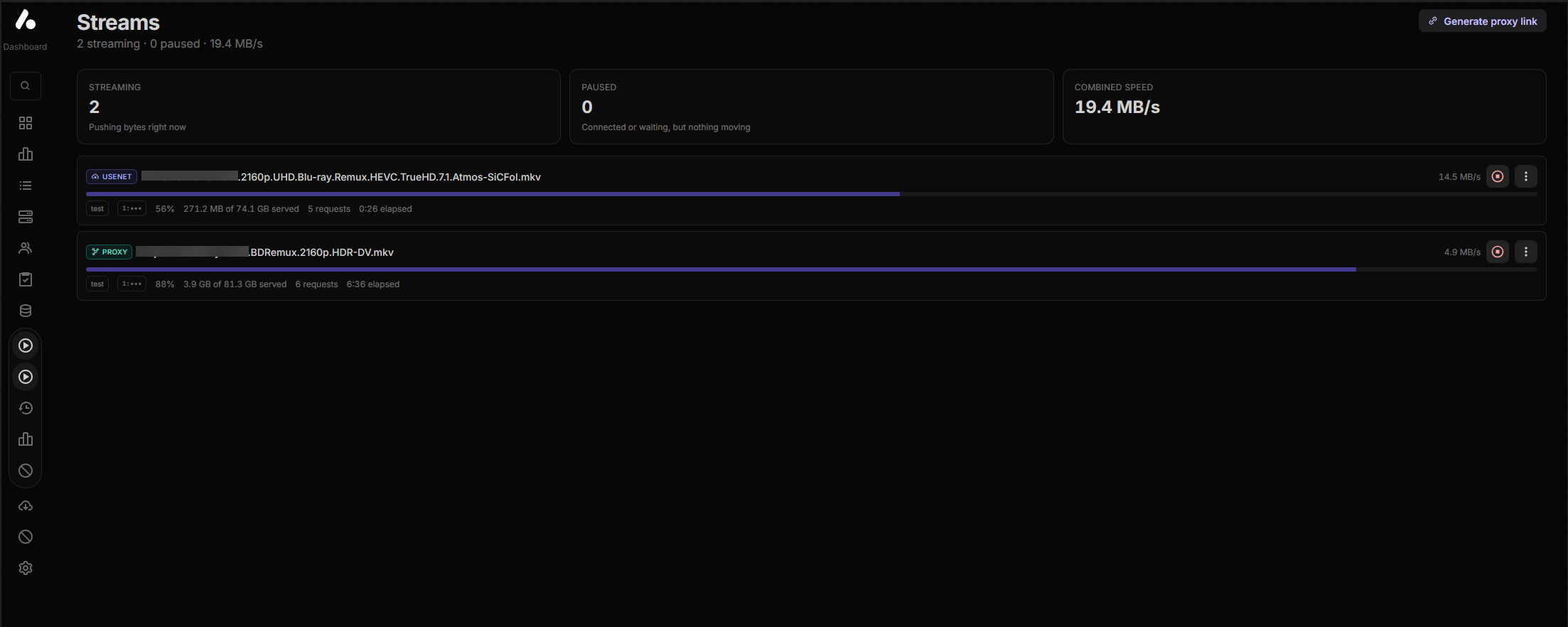
- The connection limit covers usenet streams too, so you can cap a user at a number of concurrent streams across proxied and built-in usenet playback together.
- Usenet streams have history, and proxy streams can be stopped from the dashboard.
- Temporary bans, either for a user or for one specific stream.
- Bandwidth usage over 24 hours, 7 days or 30 days, globally or per user. The 30-day window can roll, or reset on a day of the month you pick.
- Bandwidth limits, instance-wide and per user, under Settings → Streams.
The built-in usenet engine
Two changes, one to what you can see about your indexers and one to how damaged releases are handled.
Indexer metrics
The usenet Stats page now tracks NZB grabs per indexer, so you can see which of your indexers is actually producing releases that work.

Damaged releases
- Damage policy has been reworked.
strict, now the default, rejects slightly damaged releases while the damage can still be caught, so a different release gets picked instead but allows playing a damaged release if it cannot be caught in time.tolerantkeeps them on offer and glitches over the gaps on every play. Heavy damage is always rejected. - Missing pieces of an MKV are repaired as valid Matroska padding rather than raw zeros, so players skip the damaged seconds instead of stopping with an error.
- As well as some other fixes related to some NZBs not importing or importing but unplayable.
Blocklists and settings
- Blocklist sources support batch operations, and archives that cannot be streamed — compressed, solid or otherwise unsupported — are blocklisted globally rather than rediscovered per instance.
- Settings are reorganised into more intuitive groups — The new layout should be more easily navigable, and the command pallete now also shows the subsection for each search result.
Fixes and performance
The rest of the release is a long tail of fixes and performance work.
The next time you edit your configuration
Neither of these needs anything from you on upgrade. Existing configurations keep working as they are; both changes surface the next time you open your config and save it.
TorBox Search has been removed. Your configuration still loads, but the addon itself stops returning results and reports the reason as an addon error. Saving a configuration that still includes it will fail until you remove it.
Why was it removed? The built-in TorBox Search addon relied on the TorBox Search API, which provided Usenet/Torrent results. This API was shut down; as such the addon is no longer functional. It was removed to prevent confusion.
Newznab and Torznab endpoints are one URL now. The separate apiPath setting is gone,
and your existing values have already been folded into the URL for you, so there is
nothing to redo. It only matters when you add or edit one of these: enter the full
endpoint URL including its path, usually ending in /api.
Full commit-level history for this release is in the GitHub release.