

Variants
One configuration, several addons. A named script adjusts your config at request time, selected by the install URL.
Most people end up wanting the same configuration twice. One that skips 4K on the phone, one that doesn't on the TV. One with a compact formatter for a client with a narrow list, one with the full one everywhere else.
That has been possible for a while: make a second configuration and point it at the first as a parent, and it inherits everything except the sections you deliberately override. What it costs you is a second configuration to keep track of — its own UUID, its own password, its own place in your password manager — for what is often a one-line difference.
Variants are the lighter option. A variant is a named set of instructions that adjusts your configuration at request time. They live inside the config you already have, and you pick one in the install URL, so a single UUID can serve several differently-behaving addons.
Writing one
Variants are under Miscellaneous → Variants, in Advanced mode. Give one an id, a name, and a script.
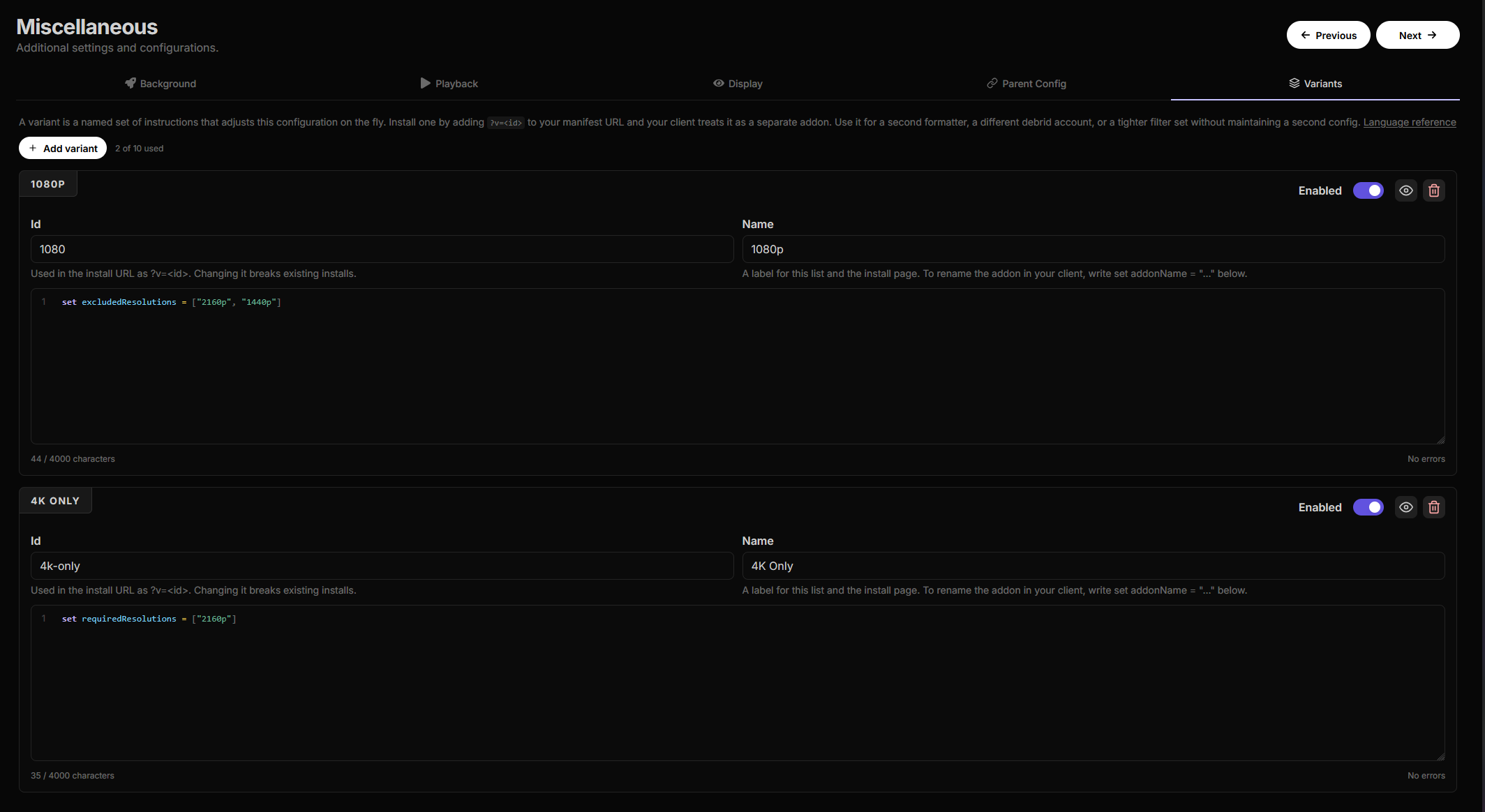
The scripts are written in the Config Expression Language. Where the Stream Expression Language is evaluated against a list of streams, CEL is declarative: one instruction per line, applied to your configuration top to bottom. Most variants are a line or two.
set addonName = "AIOStreams (Phone)"
set excludedResolutions = ["2160p", "1440p"]
set size.global.movies = [0, 8000000000]
set resultLimits.global = 10
Beyond set there is merge for deep-merging an object, add / prepend / remove for
lists, unset and clear, enable / disable as shorthand for an enabled flag, and
use formatter / use variant to pull in something you have already written. Paths drill
into the config and can select list entries by property rather than by position, so
disable presets[type=torrentio] disables every Torrentio instance and
set services[id=realdebrid].credentials.apiKey = "..." swaps one account for another. The
reference has the full instruction set, every
path selector, and
recipes for the common cases.
The editor highlights the script, autocompletes field names, real addon instance ids and your saved formatter names, and underlines errors as you type. The eye icon previews the variant as a diff against your current configuration, so you can see exactly which fields it changes before saving.
Installing one
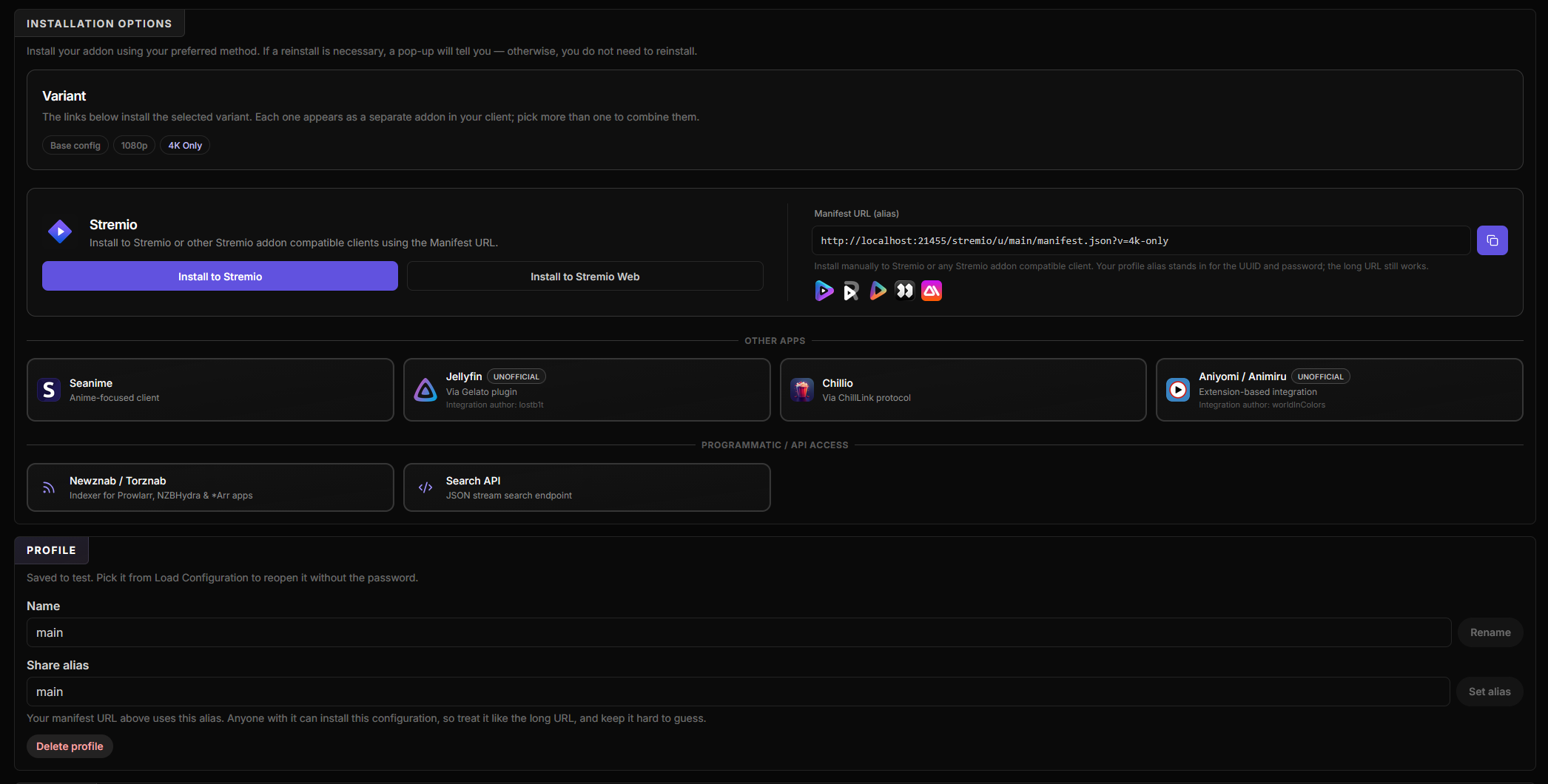
On Save/Install, pick a variant and every install link updates. Each variant gets its own Stremio addon id, so it installs alongside the base config rather than replacing it.
https://your-instance/stremio/<uuid>/<password>/v/4k-only/manifest.jsonComma-separate to combine them, applied left to right so later instructions win. The same
selector works on ChillLink and Seanime extension URLs; the Search and Newznab/Torznab APIs
take it as &v=.
Selector location, on the same card, is the one choice to make. It defaults to the path, as above. The alternative appends it as a query parameter, which is what the screenshot shows:
https://your-instance/stremio/<uuid>/<password>/manifest.json?v=4k-onlyBoth are accepted everywhere. Pick whichever form you prefer but know that some clients rebuild request URLs from the base and drop the query string, so the variant selector would be lost. The path form survives that, so it is the default. Stremio, Nuvio, the Seanime extensions, the APIs (Search and Newznab/Torznab) all support both. Chillio only supports the path form, so if you hand out a Chillio link, use that.
The URL in the screenshot is shorter than either — /stremio/u/main/manifest.json?v=4k-only
— because that configuration has a profile alias. The alias stands in for the UUID and
password, and the selector works the same on either form. See an easy way on creating aliases
in last release's changelog under configuration profiles.
Things worth knowing
- The configure page always edits the base config, even when opened with a variant selected. There is one configuration; variants are a lens over it.
- An unknown or disabled id is an error, surfaced as an error stream, rather than a silent fall back to the base config. Under a variant URL, quietly serving something else is worse than failing.
- An instruction that matches nothing is skipped and only logged. Remove Real-Debrid later and a variant that swapped its credentials keeps working instead of breaking every install URL you handed out. The preview shows these as warnings while you write.
- A patched config still goes through ordinary validation, so a variant cannot produce a configuration you could not have saved by hand, and operator limits still apply.
- Variants are not inherited from a parent config: they reference this config's own addon ids and saved formatter names.
Variants or a parent config?
Parent configs are not going anywhere, and neither replaces the other.
| Parent/child config | Variant | |
|---|---|---|
| Configs to set up | Two, each with its own UUID | One |
| Written as | Merge strategies chosen in the UI | A few lines of CEL |
| Seeing the result | After saving, by looking at the streams | A diff, before you save |
| Whose config it is | Theirs, with their own credentials | Yours, viewed through a lens |
Reach for a variant first. Most differences are one line, you can see the diff before you commit to it, and there is no second configuration to create, name and remember.
Sharing is not the dividing line. Hand your config to someone whose TV chokes on Dolby
Vision and that is still a variant — add excludedVisualTags "DV Only", give them
/v/no-dv, and they get your setup exactly, minus the one thing their hardware cannot do.
You keep one config, and it stays one config when you change it.
What a variant cannot do is give somebody a configuration of their own. A child config is editable by whoever holds it and carries their own debrid credentials, which you never see; a variant is a lens over yours, and everything it shows is yours. When the second configuration needs to genuinely belong to someone else, that is what parent/child is for.
The other reason to prefer one is taste. Parent configs are point-and-click, at the cost of not really being able to tell what a merge will produce until you look at the streams coming out of it. Variants ask you to write a little CEL, and show you precisely what changed in return.
For self-hosters
Ten variants per config, four combined per request, 4000 characters each. VARIANT_ACCESS
takes all (the default), trusted or none, and every other limit is tunable too —
the full table lists each one with its environment
variable.
Full commit-level history for this release is in the GitHub release.