

Linked accounts, community sharing and the *arrs
Push your addon to Stremio or AIOManager on save, share formatters and templates with your instance, and mount the usenet library for Sonarr and Radarr.
The widest release yet. For everyone: link a Stremio account or an AIOManager instance and your addon is pushed to it whenever a change needs a reinstall, and share formatters and templates with the other people on your instance.
The configure page got a new front door, a rebuilt setup wizard and a formatter browser. Variants can switch themselves on from the request or from a health check, three new built-in addons arrive, and the page keeps unsaved work as a draft and can keep you signed in on a device.
For self-hosters, the usenet engine grows up. Its library can be mounted as a folder over FUSE, NFS or WebDAV; Sonarr and Radarr can use it as a download client, so your media server plays a library that takes no disk; a library recheck catches releases taken down later and gets them replaced; and it starts and seeks faster on less CPU.
Beyond the engine, the process uses less memory at idle, and the dashboard overview was rebuilt around what the instance is doing right now.
For everyone
Linked accounts
Some changes to a configuration change the manifest: the addon name, the catalogs it offers, a new variant. Stremio does not notice on its own, so each one meant copying the install URL, opening Stremio and reinstalling.
On Save/Install, you can now link an account and let AIOStreams do it for you:
- Stremio, with your email and password or an auth key. The addon is installed into your account's addon collection and updated there on every push; nothing else in the collection is touched.
- AIOManager, with the instance URL and your account API key. AIOStreams asks the instance to reinstall the addon through its Hydra API.
Each linked account has its own push targets: the base configuration, any of your variants, or several. One row is one addon, so two variants on one row install as a single addon and two rows install as two. An out-of-date dot appears when the copy on the other side no longer matches what you saved, and a push button sends it whenever you like.
The new Preferences button on the same page holds two settings: how AIOStreams tells you about manifest changes (always, only significant ones, or never) and what to do with linked accounts when a change needs one (ask, push automatically, or never). Both used to be per-browser "don't show again" toggles; they are now part of your configuration, so they follow you between devices.
Credentials are stored on the instance, encrypted. Unlinking a Stremio account signs out only the session AIOStreams created for itself, never a key you pasted in. AIOManager support uses its Hydra API, which at the time of writing is only in its beta builds.
A new front door
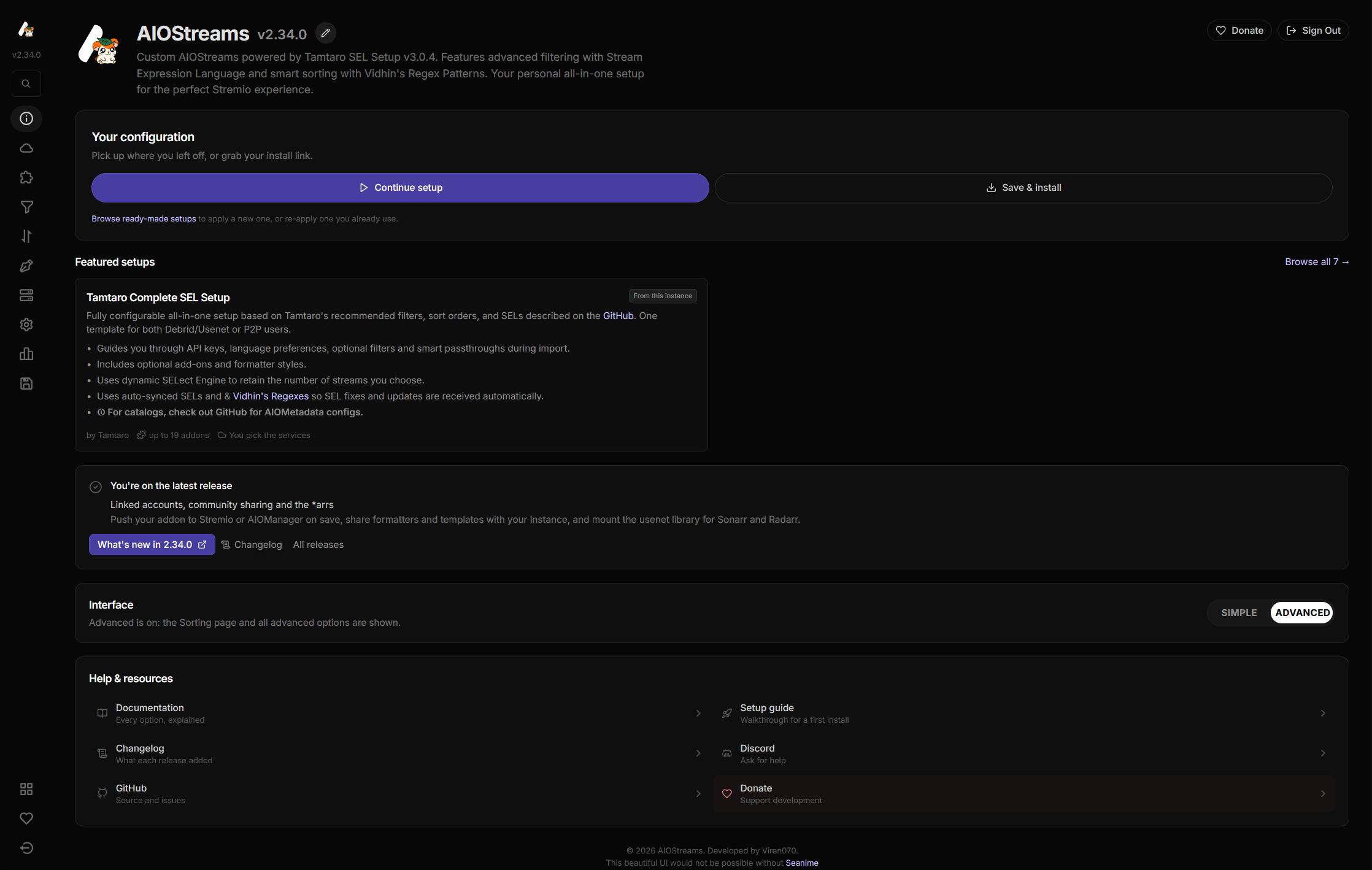
The About page is no longer a scrolling wall of GitHub releases. It opens on one action that follows your configuration: Get started when you have nothing yet, Continue or Install when you do.
Below it, a row of featured setups to apply in a click, and a What's new row that answers "should I update?" in one line and links to the entry on this site. Every release lives in a separate drawer; signing in and out and the Simple / Advanced switch are on the same page.
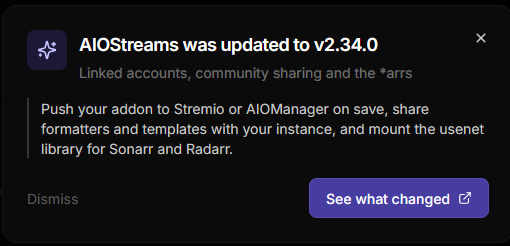
When the instance has been updated since your last visit, a short modal says what changed and links to the entry.
The restyle reaches past that page: buttons, alerts, switches, tabs, cards and modals were reworked on a calmer, desaturated palette, and the Filters page groups its tabs into blocks instead of one long column.
The setup wizard
Applying a template used to be a chain of four modals. It is now one, with a step rail on desktop and a progress bar on mobile, so you can see how far along you are and go back without losing anything.
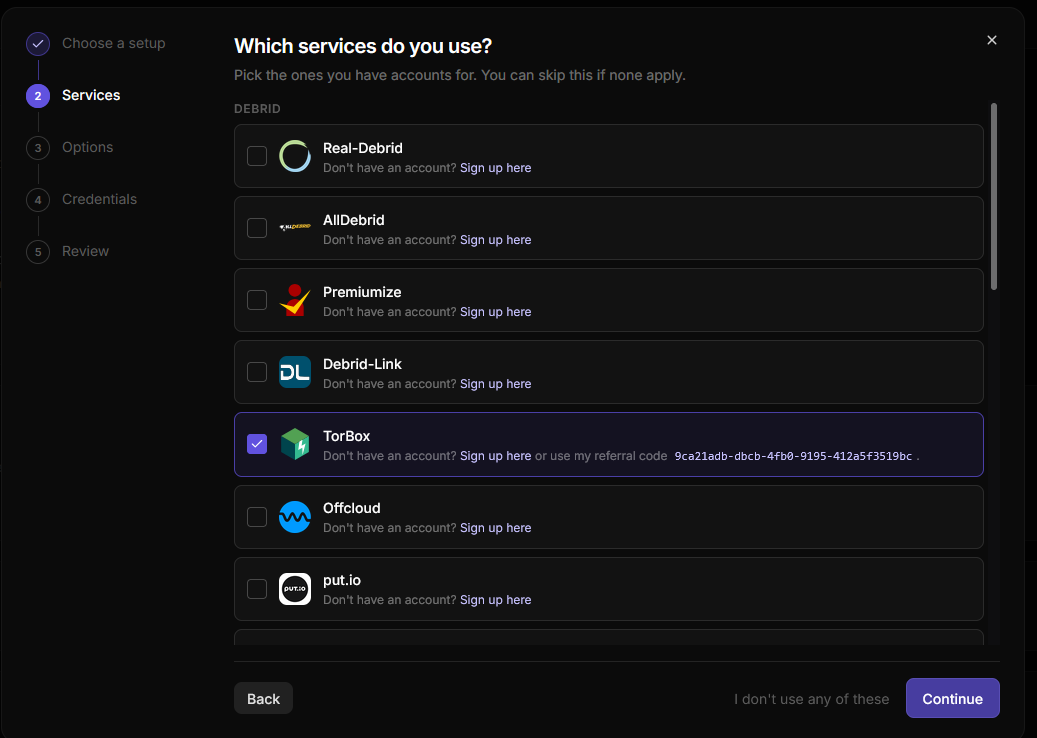
- Set up AIOStreams: use a ready-made setup, set it up yourself, or load an existing configuration.
- Choose a setup: browse the templates available on the instance, by tag.
- Which services do you use?: pick your debrid or usenet services.
- Options: the template's own inputs. Advanced ones sit behind a disclosure instead of depending on which mode you are in.
- Credentials: API keys for the services you picked.
- Ready to apply: a summary of the addons, services and credentials the setup adds, and a diff against your current configuration, so you know what it replaces. Nothing is saved to your account until you save on Save/Install.
Templates can now carry several tags rather than one category, and the browser filters on them.
Formatters
The formatter menu opens on a browser: a grid of cards in three tabs, each card previewing the sample from the preview panel. Built-in is what shipped with AIOStreams, Saved is yours, Community is everyone else's. Previews render in the browser, so they are instant and follow the sample as you edit it.
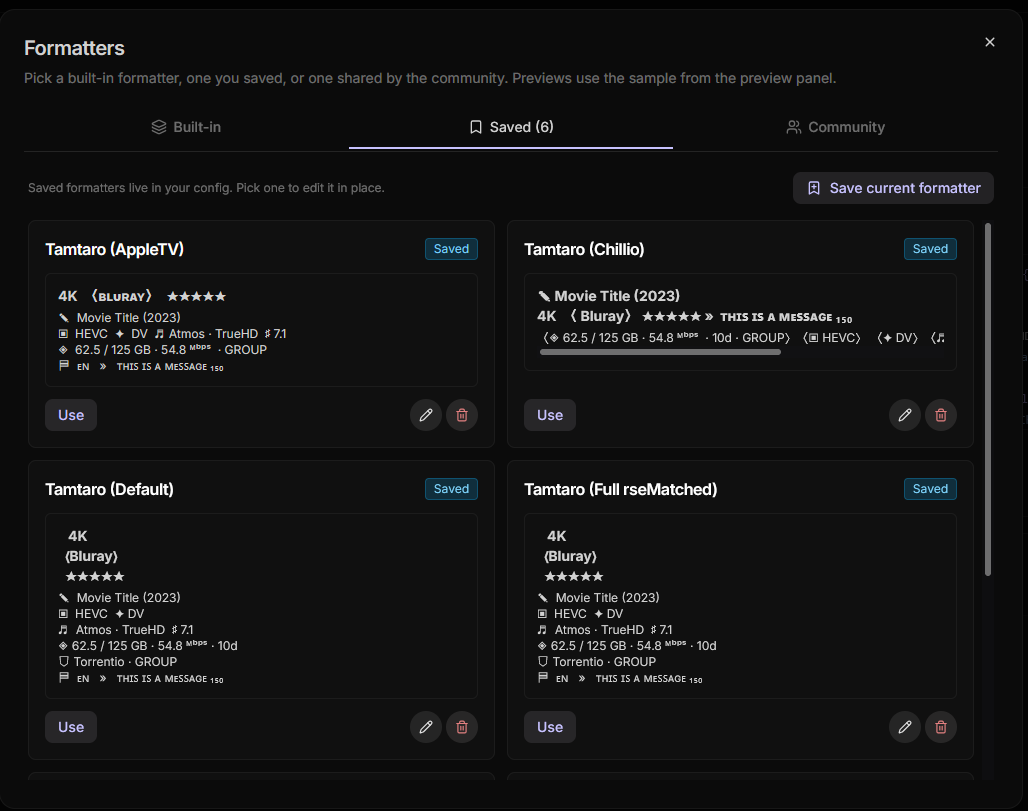
Saved formatters are edited in place. Before, you loaded one into the custom editor and saved it back out as a copy under the same name. Now selecting one makes it active, the editor underneath edits it directly, and rename and delete are on the card. The picker at the top says which kind is active: a built-in, a customised built-in, one of your saved ones, or a one-off custom template.
Sharing formatters and templates
Formatters and templates can be shared with everyone else on your instance.
Formatters. The share button asks for a name, description, author and tags, and submits the template you have open. Submissions appear in the Community tab, where you can like one and use it, which copies it into your saved formatters to edit from there.
Templates. The setup browser gains a Community source next to the instance's own templates, with a like button on each card. Sharing happens from My templates: share a template JSON you have built, or update a submission you made earlier by sharing one with the same name. Imported templates get a share icon on their card.
Templates are uploaded exactly as they are. When one is built from your configuration, service credentials, API keys and addon passwords become placeholders, but variant scripts, addon URLs, regex patterns and any other free text go in as written, and the confirmation says so. Read through it for keys, tokens or personal details before you share.
A few things to know:
- Submissions are held for review by default: an admin approves them in the dashboard before anyone sees them, unless the instance publishes immediately.
- A community template is not a trusted template unless an admin marks it as one, so its regex patterns and synced URLs are not whitelisted just for being on the list.
- Nothing ties a submission to you beyond a hash of your configuration, and likes are counted by a hash of your address. A configuration must be a day old before it can share or like, and can submit ten items a day; instances can change both.
- Items from other instances (see federation) show where they came from and cannot be liked here.
Variants that switch themselves on
A variant used to need a selector in the install URL. It can now carry an activation condition: an expression over the incoming request that applies the variant when true, with nothing added to the URL. One install serves a phone one configuration and a TV another.
includes(userAgent, 'android')A condition can read userAgent, resource, type and id, any query parameter with
query('name'), any header with header('name'), and health('id') (next section).
includes() and matches() compare strings, the latter with a regular expression under the
instance's regex rules.
Guessing a user agent is the hard part, so the Variants tab lists the last five that reached your configuration, and Test conditions shows which variants a described request would activate.
A variant named in the URL still applies, condition or not, and wins on anything both write to. A condition that fails, whether a broken expression or an unreachable check, counts as no match rather than an error.
Automatic variants share the install URL and do not change the addon id, so a condition works best on what the manifest does not describe: filters, sorting, formatting, proxying and which service plays a stream. A client that cached the manifest at install may keep showing the catalogs and name it saw then. The reference has the details.
The selector itself has moved into the path. Install links now carry a chosen variant as
/v/phone/ before manifest.json rather than ?v=phone, because some clients rebuild
request URLs from a base and drop the query string. Selector location on Save/Install
switches back to the query form; both keep working.
Health checks
A health check is a URL the instance calls to decide whether something is up. Define them in Miscellaneous → Health Checks:
- The URL and method, and the status that counts as up: a code, a class like
2xx, or a range. - Optionally a dotted JSON path and the value expected there, or some text the body must contain.
- How long a result is reused (five minutes by default), and whether a timeout counts as down.
Each check can be tested from the list.
Then read a check wherever an expression goes:
not health('rd-up')health() works in variant conditions, group conditions, the dynamic fetching exit
condition, stream expression filters and rankings, and the precache and preload selectors.
A variant can move playback to a second debrid service while the first one's status page
reports trouble, a group can be skipped while your indexer is down, a degraded service's
results can be dropped.
Every check is resolved once per request, so one request sees one answer everywhere, and results are cached and shared by URL rather than probed on every request.
New built-in addons
Three new built-ins, all contributed by webstreamr:
- TheRARBG, a public torrent indexer for movies, TV and anime in the spirit of the original RARBG, searched by title and IMDb id. It overlaps with Knaben on popular releases and goes deeper on older and less mainstream titles.
- The Pirate Bay, searched by title and IMDb id through its API.
- Anime Tosho (New), for Anime Tosho's new feed site, which mirrors Nyaa.si, TokyoTosho and other anime release sources and needs a free API key from your profile there. The existing Anime Tosho addon stays.
All three run inside AIOStreams and return debrid results.
Drafts
The configure page used to write whatever was on screen to the browser's storage on every change and load it back on every visit, saved or not, so an experiment abandoned weeks ago could reappear as your configuration.
Drafts replace that. A draft exists only while what is on screen differs from what you last saved. A refresh restores it silently; close the tab and come back later, and a banner offers it instead: Unsaved changes from 20 minutes ago, with Restore, Discard, and a Don't keep drafts on this browser link that turns the feature off there for good.
Drafts are kept per configuration for seven days, including one made before signing in. Whatever the old behaviour left in your browser is carried over as a draft once and offered the same way, never loaded on its own.
Staying signed in
Signing in has a new Stay signed in on this device box. Tick it and the configuration opens without its password next time, for as long as you keep coming back: on the instance's defaults, 30 days from last use and never more than 90 from when it was made. It is a cookie the page's scripts cannot read, so the password itself is never stored on the device.
Sign out asks whether to sign out on all devices, revoking every remembered sign-in for the configuration at once.
Smaller things
- Parallel groups have a "When a Condition Fails" setting. With parallel fetching a group can already have results by the time an earlier condition fails. Stop discards it and everything after it as before; Skip group and keep checking drops just that group and evaluates the rest; Keep everything already finished includes every group that has finished, conditions or not. The groups guide has the details.
mediaInfoQualitytells you where a stream's media info came from:probe(read from the file),indexeroraddon. It is available as a formatter field and as a stream expression function.folderSize()filters on the size of the whole folder or torrent, wheresize()looks at the file.- The groups editor is rebuilt on the same sortable rows the ranked lists use, so it
works on a phone, and a selection of many addons collapses to
+N moreinstead of growing the box. - Editions are shown in the Google Drive, LightGDrive and Prism formatters.
- New parser tags: MPEG-4 encode and PCM audio.
- USA TV Next is available as a preset, and Easynews++ subtitle languages are read from its results.
- The Seanime extension can be installed with a variant selected.
For self-hosters
The usenet engine
The engine's biggest release since it arrived in 2.31. Its library can be mounted as a folder, handed to Sonarr and Radarr, and rechecked so it stays playable, and it is faster. Its settings have moved onto Settings → Usenet, grouped into cards, with Shares and Sonarr / Radarr as tabs beside it; fields the old page hid, such as the performance profile and read-ahead, are now on it.
Performance
The first performance pass since the engine shipped. In the usenet streaming benchmark, which runs nine applications over the same corpus against a real provider, AIOStreams is now the fastest of the nine to the first byte and to completing a seek.
- Starts and seeks faster. A seek reaches the first byte in about a third of the time it took (518 ms to 151 ms), a cold open in about half (203 ms to 97 ms), and a seek downloads about half the surplus bytes it used to.
- Less CPU. About 15% less per GiB delivered, no burst on seeks, and password-protected archives now cost about the same to stream as unencrypted ones.
- Less memory after playback. Memory drops back down once a stream ends (418 MiB to 232 MiB at idle in a container) instead of staying where the stream left it.
Prefetch segments is capped at 256. Higher values only bought buffer depth, at gigabytes of memory per stream and a full refetch of it on every seek. See Upgrading if you had it higher.
Shares
The usenet library is now a read-only folder tree other software can mount, in three branches:
usenet/completed/— one flat folder per grab, which is what Sonarr and Radarr import from.usenet/content/— every release laid out as its NZB was, for browsing.usenet/by-id/— a stable address per file that every symlink points at.
Three ways to reach it, all under Settings → Shares, all serving the same tree:
- Mount the library here (
SHARES_FUSE_ENABLED) mounts it in-process at a path you choose, with real symlinks and changes that appear at once. Linux only: it needs/dev/fuseandSYS_ADMIN, and in Docker a bind of the mount's parent withrsharedso the other containers see it. A mount status panel on the tab says whether it is mounted or exactly what is missing, and mounts and unmounts without a restart. - NFS server (
SHARES_NFS_ENABLED) exports the tree over NFSv4 on port 2049, for a Linux host or container elsewhere to mount natively. NFSv4 carries no login, so Allowed clients (private networks by default) is the whole of the access control. - WebDAV server (
SHARES_WEBDAV_ENABLED, on by default) serves it at/webdavto anyAIOSTREAMS_AUTHuser holding the newwebdavpermission. Mount it with rclone where FUSE cannot run, Windows and macOS included, or point Infuse, VLC or a file manager at it and mount nothing at all.
Connect, on the same tab, writes out the rclone commands, the NFS mount line and the
Docker compose fragment with your own URL and paths filled in. If you run rclone yourself
with --rc, Remote control URL (SHARES_RCLONE_RC_URL) lets AIOStreams tell it to drop
its directory cache whenever the library changes, so a finished download shows up at once
instead of when --dir-cache-time expires.
A stream started through a share carries no login, so it is attributed to a Stream owner name in the dashboard and stream limits, and reads through a share are exempt from connection caps, so a media server scan that opens many files at once is fine.
Sonarr and Radarr
The SABnzbd-compatible API from 2.31 let the arrs grab through the engine, but nothing could be imported. Now it can. A grab is inspected, exposed on the share, and the arr imports a symlink into its library; Plex, Jellyfin or Emby play that symlink and the bytes stream from usenet on demand.
You keep the arr's automation, profiles, upgrades, renaming and monitoring, and the library costs no disk.
The wiring lives in Settings → Sonarr / Radarr:
- Mount directory (
ARR_MOUNT_DIR) is the path at which the arrs see the mount. It is reported back as the completed-download folder and used as the target of every symlink, so it must be the same absolute path in every container that reads the mount. Left empty, the API stays metadata-only as before: grabs work, imports do not. - Import mode (
ARR_IMPORT_MODE):symlink(the default),strmfiles holding a stream URL for Jellyfin and Emby with no mount at all, orcontent, which exposes the bytes and has the arr copy the whole release through usenet on import. - Sonarr / Radarr instances (
ARR_INSTANCES): one row per arr with its URL and API key, each with a connection test. With an instance linked, AIOStreams nudges the arr the moment a grab is ready instead of waiting for its next check.
A linked instance also lets AIOStreams act on the arr's behalf after the import.
Replacing dead releases. When the library recheck finds a release gone, it can be handed back to the arr to find again.
- Repair automatically (
ARR_AUTO_REPAIR, on by default) removes the file record the import produced and marks the grab failed, so the arr blocklists the release and searches again through its own Redownload Failed setting. - Search after repair (
ARR_SEARCH_AFTER_REPAIR) asks for that search from this side instead, for when the arr's own Redownload Failed is off. - Repair attempts per item (
ARR_MAX_REPAIRS_PER_ITEM, three) stops a title whose releases all come from one dead poster cycling forever: at the limit the release is blocklisted without another search and the item is unmonitored.
With automatic repair off, entries are still marked failed and shown in the library, each with a Replace via Sonarr/Radarr button and details of how far the repair got.
Cleaning up stuck imports. An import the arr refuses for its own reasons sits in its
queue until someone notices. Clean up stuck queue items (ARR_QUEUE_CLEANUP_ENABLED,
off by default) watches the queues of your linked instances and acts on the reason the arr
gave, one rule per reason.
- Replace — blocklist the release and search for another.
- Blocklist — blocklist it without searching.
- Import — push the import through, with the episode or movie the arr pre-filled.
- Remove — clear the entry and nothing else.
Every reason ships with a default: a pack missing an episode is replaced, a title the arr could not match is imported, a full disk is left alone. An item has to stay stuck for a grace period (five minutes) first, and only downloads AIOStreams handed over are ever touched.
Holding the hand-off. By default a download is handed to the arr as soon as the quick
inspect passes, and a failure the article census finds afterwards is repaired through the
linked instance. Hold SABnzbd hand-off for the census (USENET_ARR_WAIT_FOR_CENSUS)
keeps it reported as downloading until the census finishes instead, for setups without a
linked instance to repair through.
The Sonarr / Radarr guide walks through the whole setup, with complete Docker stacks for the FUSE and rclone variants and a troubleshooting section built from the ways it goes wrong.
Library recheck
A release that was fine when it was added can be taken down weeks later, and nothing notices
until someone presses play. Settings → Usenet → Library recheck
(USENET_RECHECK_SCOPE, off by default) re-verifies entries against your providers on a
schedule keyed to the age of the post, since new posts are the ones that vanish: hourly for
the first day, every six hours for the first week, daily for the first month, monthly after
that. Every band is editable, and can be set to never.
Three settings control the rest:
- Scope — entries added through the SABnzbd API, or everything, playback included.
- Recheck depth — probe a spread of articles and audit the whole release only when one is missing, or audit everything every time.
- Recheck hours — keep the probing out of your evening.
A dead release becomes failed, which stops it being offered as a stream, and gets replaced when a linked arr grabbed it. Small damage follows the damage policy, as it does at import.
Verify file contents (USENET_VERIFY_CONTENT, off by default) goes one step past the
article audit: it reads the first few kilobytes of each media file and checks it really is
the container its name claims, which catches a release whose articles all exist but were
posted or assembled wrong. It costs about one article per file, at import and on every
recheck.
Also in the engine
- The engine serves audio now. MP3, M4A and M4B, FLAC, Ogg and Opus, AAC, WMA, WAV and AIFF files are recognised by their content as well as their name and streamed the way video is, and the SABnzbd API advertises the book and audiobook categories the usual clients send. Linked instances are still Sonarr and Radarr only.
- Provider and indexer stats can be reset from the usenet Stats page, per row or all at once, for all recorded history, this hour, the last 24 hours or the last 7 days, so a bad night can be cleared without losing the month. Providers you have removed keep their history on the page, flagged as removed, until you reset it.
Less memory at idle
Expect the process to sit lower than it did, usenet engine or not. It starts with roughly
200 MB less: most of that was heap Node reserved from host RAM and never used, which the
Docker image and pnpm start now cap, and the anime database, ID mappings and a couple of
libraries were slimmed down too. Starting on a fresh database, where the anime database has
to be built, went from 24 s to 10 s. On bare metal the cap is a Node flag; see
Upgrading.
To watch it, Dashboard → System has a memory graph: the last five minutes of this process, broken down into heap, buffers and the rest, or the whole machine with this process marked on it.
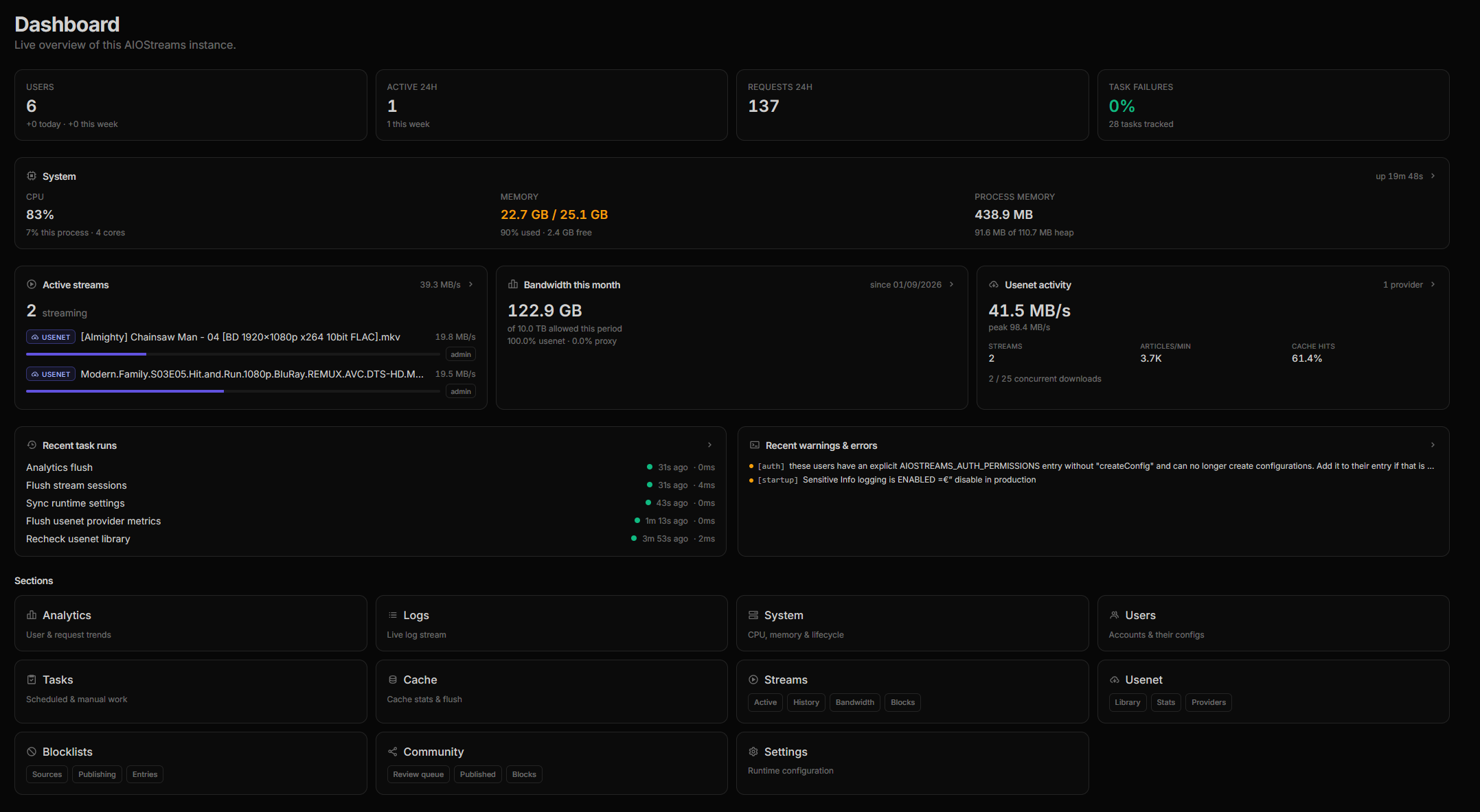
The dashboard overview
The overview page was rebuilt around what the instance is doing right now.
- A top row of users, active users, requests in the last day, task failures and, when there are any, the community review queue with a link into it.
- A System card with CPU, memory and process memory, beside Active streams and Bandwidth for the month.
- Usenet activity, when usenet is configured: live streams, articles per minute and cache hits.
- Recent task runs, and recent warnings and errors.
Every section link now says what it is for.
Community sharing
Everything under sharing is controlled from Settings → Community.
- Community formatters (
COMMUNITY_FORMATTERS) and Community templates (COMMUNITY_TEMPLATES) each take off, open or approval. Both default to approval: names, descriptions and tags are free text shown to everyone, and a template can point addons at arbitrary hosts. - Minimum account age (
COMMUNITY_MIN_ACCOUNT_AGE, one day) and Max submissions per day (COMMUNITY_MAX_SUBMISSIONS_PER_DAY, ten) limit how cheaply someone can flood the list or skew the likes. Setting the daily limit to 0 keeps the browser but closes submissions.
Moderation lives at Dashboard → Community, in three tabs.
- Review queue — pending submissions, each with a summary of what a template touches: its addons, variant scripts and regex. Approve it, approve it as trusted, or reject it with a reason the submitter sees. Trusted whitelists its regex patterns and synced URLs, like the instance's own templates.
- Published — everything live, with a trusted toggle, reset likes and delete. An update to an approved item waits as a draft while the live version stays up.
- Blocks — the configurations and addresses you have barred from submitting or liking.
Federation lets a self-hosted instance show what a public one has approved. Every
instance serves its approved items at /community/export.json (Public community export,
COMMUNITY_PUBLIC_EXPORT, on by default; turn it off if you would rather not be a source).
Point Remote community sources (COMMUNITY_REMOTE_SOURCES) at one or more instance URLs
and their items appear read-only in your browser, labelled with where they came from,
refreshed on the Remote community refresh interval (COMMUNITY_REMOTE_REFRESH_INTERVAL,
one day). Only URLs on public addresses are accepted.
Two related settings arrived with this. The API's JSON body limit, which a large template
or configuration could hit, is now Settings → General → Max JSON request body
(MAX_JSON_BODY_SIZE, default 256 KiB, restart required), and creating a configuration
has its own rate limit, USER_CREATE_RATE_LIMIT_*, ten per hour per address.
Controls for the new features
The rest of what is new for everyone has a switch or a limit on the instance side.
- Linked accounts (
LINKED_ACCOUNTS_ENABLED, on) sits under Settings → General; off hides the feature and refuses every request to it, keeping existing links but never using them. Allow private linked account URLs (LINKED_ACCOUNTS_ALLOW_PRIVATE_URLS, off) is for an AIOManager on a private or loopback address, such ashttp://aiomanager:1610on a Docker network; it lets anyone who can create a configuration make your server send requests to your internal network, so only enable it on a trusted instance. The endpoints have their ownLINKED_ACCOUNTS_API_RATE_LIMIT_*. - Remembered configuration sign-ins (
CONFIG_SESSIONS_ENABLED, on), also under Settings → General, controls the stay-signed-in box. Remembered sign-in lifetime (CONFIG_SESSION_TTL_SECONDS, 30 days) is how long one survives unused, and Remembered sign-in maximum lifetime (CONFIG_SESSION_MAX_TTL_SECONDS, 90 days) is the hard cap from creation, never extended by use, so a copied cookie still dies on a known date. - Health checks are bounded under Settings → User Limits: who may define them
(
HEALTH_CHECK_ACCESS: everyone, trusted users or nobody), how many per configuration (MAX_HEALTH_CHECKS, five), the shortest interval (HEALTH_CHECK_MIN_TTL, a minute), the longest timeout (HEALTH_CHECK_MAX_TIMEOUT, ten seconds) and how much of a response is read (HEALTH_CHECK_MAX_BYTES, 64 KB). URLs on private addresses are refused unless Allow private URLs (HEALTH_CHECK_ALLOW_PRIVATE_URLS) is on, for the same reason as above, and a check can never point at the instance itself.
Upgrading
Nothing in this release changes URLs, breaks an installed addon or needs a migration by hand. A few things are worth checking.
Trusted proxies. The default for Settings → General → Trusted IPs (TRUSTED_IPS)
used to be Docker's default bridge and loopback. It is now the named ranges loopback,
linklocal and uniquelocal, so a reverse proxy on any private network is trusted without
configuration. Forwarded headers are honoured only from trusted addresses, which decides
the client IP used for rate limiting and whether session cookies are marked Secure. A proxy
on a public address still has to be listed, as before.
Usenet settings moved. The settings tab on the Usenet page is gone; everything is under Settings → Usenet, with Shares and Sonarr / Radarr beside it. Environment variables are unchanged.
What is on by default. Linked accounts, remembered sign-ins, community sharing (in
approval mode, so nothing is visible without an admin) and the WebDAV share, which only
answers AIOSTREAMS_AUTH users with the webdav permission (a user with no permission list
has all of them).
Off until you turn them on: the FUSE mount, the NFS server, the library recheck and queue cleanup. Controls for the new features and Shares say where.
Prefetch segments above 256. The setting is now capped. A stored value above the cap is reset to the default with a warning in the log; a dashboard save above it is a validation error; an environment variable above it is a startup error, like any other invalid value.
Bare-metal Node flags. The Docker image now starts Node with
--max-semi-space-size=8 --expose-gc. pnpm start includes the first. If you launch
node packages/server/dist/server yourself and want the lower boot memory and the
after-playback memory release, add both.
Building from source. The native AES module in packages/crypto compiles with
node-gyp using the same toolchain yencode already needs.
If the build fails it prints a warning and the engine falls back to Node's own crypto; the
only thing you lose is the encrypted-archive CPU improvement. The FUSE mount ships prebuilt
for x86-64 and arm64 Linux and needs no toolchain; on other platforms the option is simply
unavailable. Docker users have nothing to do.
The mode prompt is gone. Existing visitors keep whichever of Simple or Advanced they already chose. New ones start in Simple and can switch on the About page.
Full commit-level history for this release is in the GitHub release.